GUIDE · CUSTOMER PORTAL
CUSTOMER PORTAL: GOOD SERVICE SHOULDN’T MEAN MORE WORK.
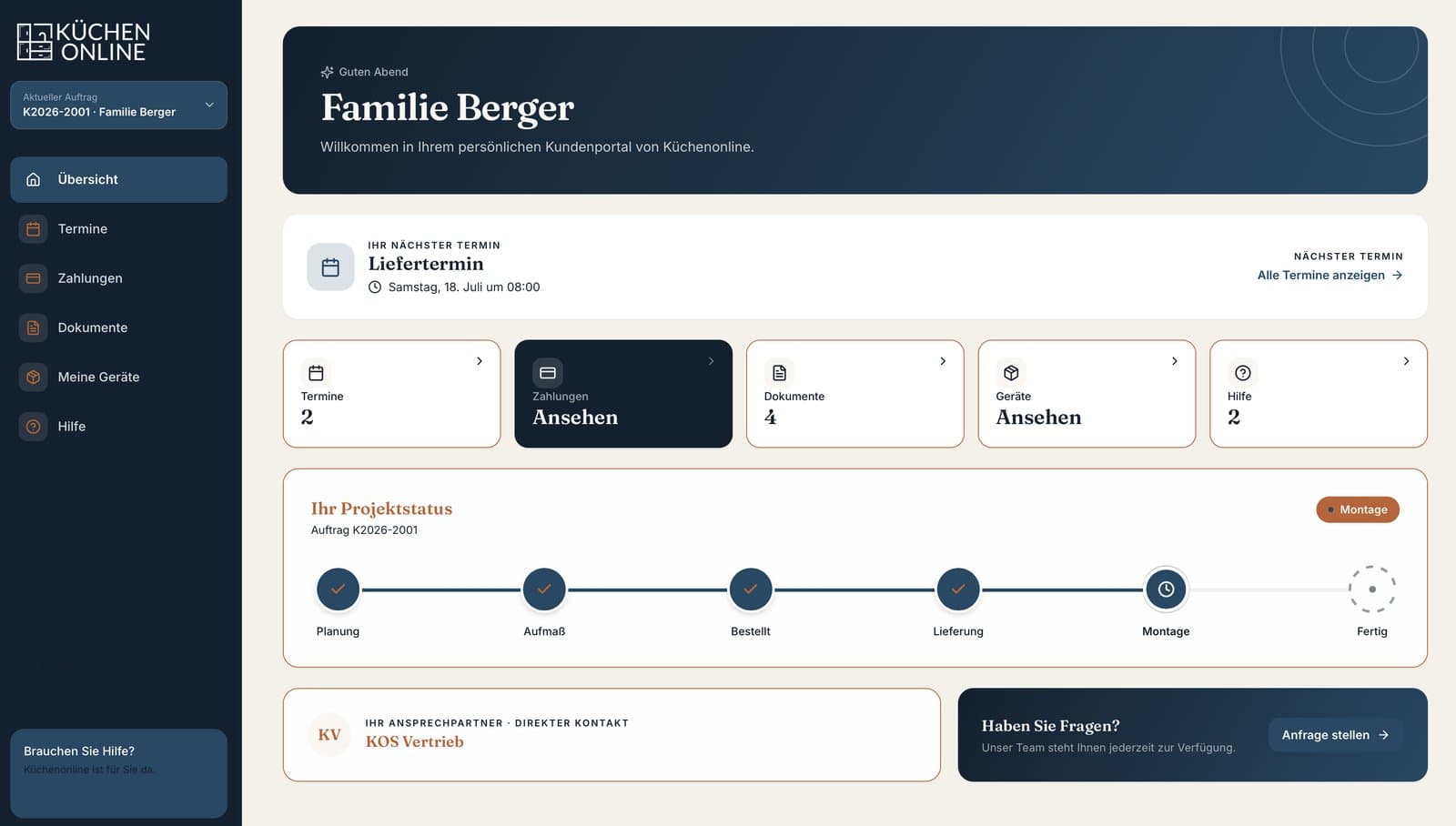
Your customers want to know what happens next. Your team wants to get on with their orders without sending every update individually. A customer portal brings both together: progress, documents and next steps are available in one place. Customers can look things up and handle tasks they would otherwise call about, leaving your team more time for the questions that need personal attention.
Author: Michael Labitzke, Technical Director, Cyntro Systems · Updated:
AT A GLANCE
- Customers can check their order’s progress outside office hours.
- Quotes, plans and invoices stay together in one place.
- Appointments and approvals can be handled alongside the order.
- Your team spends less time finding documents or repeating updates.
- Customers have a place for documents and service requests after the purchase, too.
FEWER ENQUIRIES. A CLEARER PICTURE.
There is often a wait between placing an order and delivery. Work continues inside your business, but customers see little of it. They ask for updates because they lack information. A portal lets them see which steps are complete, what comes next and whether you need anything from them. That gives customers a clearer picture and saves your office individual status enquiries. The information needs to stay current. Pulling it from the order system avoids asking your team to maintain a second set of records.
DOCUMENTS YOU CAN FIND WHEN YOU NEED THEM.
The quote is in one email, the revised plan in another, and someone has printed the invoice. Once several people are involved, keeping track becomes difficult. A customer portal keeps documents with their order. Customers can open the approved plan or download an invoice again without asking someone to send it. Your team spends less time finding and resending files. The portal should make it clear which version is current and which documents are intended for the customer.
MAKE DECISIONS WHEN IT SUITS YOU.
An appointment needs confirming, a specification needs choosing or a quote needs approval. Phone calls do not always connect, and email can lose the context. In a portal, the pending decision sits alongside the order and its supporting documents. Customers can review it in their own time and respond when convenient. Your team can see what is outstanding and plan the next step. Depending on the workflow, appointment booking or electronic signatures can also be included. Personal advice remains a phone call away.
SERVICE THAT CONTINUES AFTER THE SALE.
Delivery rarely marks the end of a customer relationship. Later, someone needs a manual, a spare part or a maintenance appointment. A portal keeps the relevant documents available. Customers can send a service request linked to their order and add a photo if needed. Your team has the context without first piecing it together over the phone. This is especially useful for products and services customers use for years. The portal needs to be as clear on a phone as on a computer, with a next step people can find without an explanation.
WHAT CHANGES DAY TO DAY WITH A CUSTOMER PORTAL
By phone and email
Order progress
The customer asks; your office looks it up and replies.
Documents
Files sit in different inboxes and have to be sent again.
Decisions
Questions and replies spread across multiple messages.
Availability
Both sides need to find time for a status update.
After-sales service
Customers and staff piece together old records and files.
Personal contact
Routine enquiries interrupt advice and order work.
With a customer portal
Order progress
The customer checks the recorded status directly.
Documents
Approved documents are available with the order.
Decisions
The decision stays with the relevant documents.
Availability
Information is accessible outside office hours.
After-sales service
The request links directly to the existing order.
Personal contact
More room for questions that need a conversation.
WHAT PEOPLE OFTEN ASK US ABOUT THIS
Can a portal be worthwhile for a small business?
Yes, when repeated enquiries and sending documents take up a noticeable amount of work. Look at the workflow: How often do customers ask for updates, how long does an order last, and what could they do themselves? Email may be enough for a few brief interactions. Start with the tasks that currently take up the most time.
Do we have to replace our existing software?
A portal can often connect to an existing order, CRM or invoicing system. This depends on the interfaces and access rights available. The aim is for your team to maintain orders and documents once. An extra interface that needs updating by hand every day offers little relief.
Do our customers need an app?
For many portals, a browser on a phone, tablet or computer is enough. Customers follow a link and sign in without installing anything. A dedicated app may make sense for specific device features or offline use. It is usually unnecessary for updates, documents and approvals.
How are customer data protected and content kept current?
Each customer gets access to the information intended for them. Access rights, storage location and data handling are agreed before launch. Day-to-day responsibilities matter too: Who maintains content, helps with sign-in problems and handles updates and backups? Those questions belong in the initial plan.
What does a customer portal cost?
The work depends mainly on which tasks customers should handle themselves and which existing systems need connecting. Ongoing support also needs to be included. In a free initial consultation, we discuss the main workflows. You then receive a fixed-price proposal for the agreed scope.

WHAT WOULD YOUR CUSTOMERS LIKE TO DO THEMSELVES?
Check an order, arrange an appointment or find an invoice? In a free initial consultation, we look at your day-to-day work and where a portal could save effort for customers and staff.